
Managing .env files across multiple deployment environments is one of those problems that starts simple and quietly gets out of hand. Copy-paste a production config to create a staging one, forget to update a value, ship a bug. Or worse, accidentally commit a secret. Or forget to set a value and spend too much time debugging an unexpected issue. Most projects end up with either a mess of manually maintained files or a fragile shell script someone wrote in a hurry.
Dotenv/C is an open-source tool I built to solve this properly. It compiles a single .env file from layered, environment-specific source files, letting you define values once and override only what changes per environment. This post walks through a real-world setup showing how to structure a project with multiple environments, shared configuration templates and secret injection at deployment. While this example uses a Laravel project, Dotenv/C works with any stack that reads .env files.
Installation as a Git Submodule
For this project, Dotenv/C is installed as a git submodule into deploy/dotenvc, keeping it isolated from the project codebase and easy to update independently:
git submodule add https://gitlab.com/isgdev/dotenvc.git deploy/dotenvc
This installs Dotenv/C into the project in deploy/dotenvc/.
The environment source files live in deploy/environments/, separate from the submodule so they can be committed to the project repository. The configuration file at deploy/.dotenvc tells Dotenv/C where to find everything:
PROJECT_DIR=..
ENVIRONMENTS_DIR=deploy/environments
To keep any potential local configuration adjustments as well as the local environment settings out of the repo, these should be added to your project’s .gitignore:
/deploy/.dotenvc.local
/deploy/environments/local
The project directory structure looks like this:
your-project/
  ├── deploy/
  │     ├── dotenvc/            # Dotenv/C (a git submodule)
  │     ├── environments/       # environment source files
  │     └── .dotenvc            # Dotenv/C config (committed)
  ├── .env                      # compiled output (gitignored)
  ├── .env.example              # base template (committed)
  └── .gitignore
The Base Template
The .env.example in the project root serves as the base template. It defines every key the application uses, with safe defaults where possible and __REQUIRED__ for anything that must be set by a child environment file:
APP_NAME=MyApp
APP_ENV=__REQUIRED__
APP_URL=https://example.com
APP_KEY=__REQUIRED__
APP_DEBUG=false

APP_LOCALE=en
APP_FALLBACK_LOCALE=en

BCRYPT_ROUNDS=12

LOG_CHANNEL=stack
LOG_STACK=single
LOG_LEVEL=warning

DB_CONNECTION=mysql
DB_HOST=127.0.0.1
DB_PORT=3306
DB_DATABASE=myapp
DB_USERNAME=__REQUIRED__
DB_PASSWORD=__REQUIRED__

SESSION_DRIVER=redis
SESSION_LIFETIME=120

QUEUE_CONNECTION=redis
CACHE_STORE=redis

REDIS_CLIENT=phpredis
REDIS_HOST=127.0.0.1
REDIS_PASSWORD=null
REDIS_PORT=6379
REDIS_PREFIX=
REDIS_CACHE_DB=0
REDIS_SESSION_DB=1
REDIS_DATA_DB=2

MAIL_MAILER=log
MAIL_HOST=127.0.0.1
MAIL_PORT=2525
MAIL_FROM_ADDRESS="no-reply@example.com"
MAIL_FROM_NAME="${APP_NAME}"
Every key is defined here. Child environment files only need to specify what differs.
Shared Templates
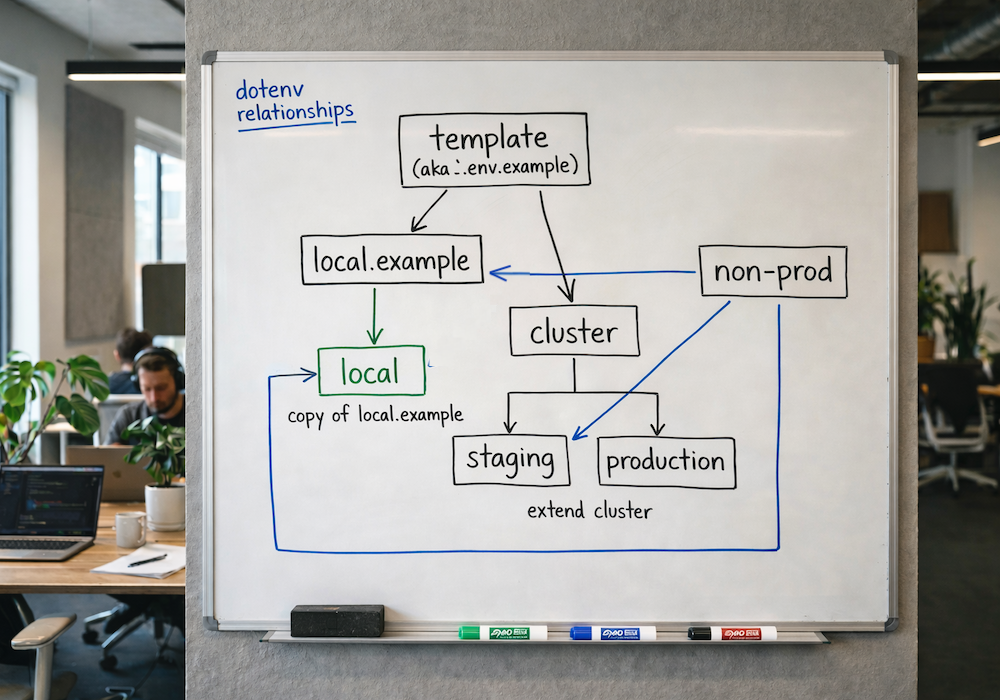
This project deploys to a clustered infrastructure for staging and production, with settings that differ significantly from local development, including a remote database, Redis, S3 storage and a real mailer. Rather than repeat those in every environment file, a _cluster template captures them.
deploy/environments/_cluster
# Cluster Template
# @extend env

DB_HOST=__REQUIRED__
REDIS_HOST=__REQUIRED__

AWS_ACCESS_KEY_ID=__REQUIRED__
AWS_SECRET_ACCESS_KEY=__REQUIRED__
AWS_DEFAULT_REGION=us-east-2
AWS_BUCKET=__REQUIRED__
AWS_USE_PATH_STYLE_ENDPOINT=false

MAIL_MAILER=__REQUIRED__
This file extends the base template and introduces the infrastructure keys that only cluster environments need. The __REQUIRED__ values here will be satisfied by whichever environment file extends _cluster.
There is also a _nonprod file for settings specific to non-production environments. Since staging and local use subdomains rather than the production domain, this avoids repeating those overrides in each file. It also demonstrates the @{ENV} insertion variable, which Dotenv/C replaces with the environment name at compile time.
deploy/environments/_nonprod
# Non-Production Settings

APP_URL=https://@{ENV}.example.com
MAIL_FROM_ADDRESS="no-reply@@{ENV}.example.com"
MAIL_FROM_NAME="${APP_NAME} (@{ENV})"
Unlike the environment files, _nonprod has no @extend directive. It is not compiled directly, and is only ever included into other files via @include.
Note the @@{ENV} in the email address. The first @ is a literal character in the value, and @{ENV} is the insertion token immediately following it.
Local Development
A developer’s local environment file extends the base template and includes _nonprod for URL and mail overrides. It enables debug mode, extends the session lifetime and sets a Redis prefix to avoid key collisions with other local projects. Since the local file contains developer-specific values, it is in .gitignore. A local.example is committed instead, with __REQUIRED__ in place of any real values. Developers simply copy deploy/environments/local.example to deploy/environments/local and set their values.
deploy/environments/local.example
# @extend env
# @include _nonprod

APP_ENV=local
APP_KEY=__REQUIRED__
APP_DEBUG=true

LOG_LEVEL=debug

DB_USERNAME=__REQUIRED__
DB_PASSWORD=__REQUIRED__

REDIS_PREFIX=myapp:

SESSION_LIFETIME=360
Staging and Production
Both staging and production extend _cluster rather than the base template directly, inheriting its infrastructure keys on top of the base. Staging also includes _nonprod for subdomain URLs and mail settings; production does not, since it uses the defaults already set in the base template.
All sensitive values are secret tokens, resolved at deployment time from AWS Secrets Manager.
deploy/environments/staging
# @extend _cluster
# @include _nonprod

APP_ENV=staging
APP_KEY=base64:__SECRET:myapp/staging/app-key__

DB_HOST=db.staging.example.com
DB_USERNAME=__SECRET:myapp/staging/db-username__
DB_PASSWORD=__SECRET:myapp/staging/db-password__

REDIS_HOST=redis.staging.example.com
MAIL_MAILER=ses

AWS_ACCESS_KEY_ID=__SECRET:myapp/staging/aws-key__
AWS_SECRET_ACCESS_KEY=__SECRET:myapp/staging/aws-secret__
AWS_BUCKET=__SECRET:myapp/staging/aws-bucket__
deploy/environments/production
# @extend _cluster

APP_ENV=production
APP_KEY=base64:__SECRET:myapp/production/app-key__

DB_HOST=db.example.com
DB_USERNAME=__SECRET:myapp/production/db-username__
DB_PASSWORD=__SECRET:myapp/production/db-password__

REDIS_HOST=redis.example.com
MAIL_MAILER=ses

AWS_ACCESS_KEY_ID=__SECRET:myapp/production/aws-key__
AWS_SECRET_ACCESS_KEY=__SECRET:myapp/production/aws-secret__
AWS_BUCKET=__SECRET:myapp/production/aws-bucket__
Compiling
To compile the .env for an environment, run the compile command from the project root:
deploy/dotenvc/bin/compile local
In a CI/CD pipeline, the recommended approach is to compile without secrets during the build stage, then inject them separately at deployment:
# Build stage
deploy/dotenvc/bin/compile --skip-secrets production

# Deploy stage
deploy/dotenvc/bin/secrets
This keeps secrets out of build artifacts entirely. The compiled .env can be safely stored as an artifact without any sensitive values in it.
The DRY Result
The inheritance chain for each environment looks like this:
local:      .env.example → local + _nonprod
staging:    .env.example → _cluster → staging + _nonprod
production: .env.example → _cluster → production
Each environment file defines only what is specific to it. Everything else flows down from the base template or _cluster. Adding a new key to the base template propagates to all environments automatically, without touching individual environment files, which is exactly the point.
The full Dotenv/C project is available at gitlab.com/isgdev/dotenvc.